
You can disable your recurring subscription through the billing section under your profile.
Follow the steps below to disable your recurring subscription:
- Log in to your account https://medality.com/login/
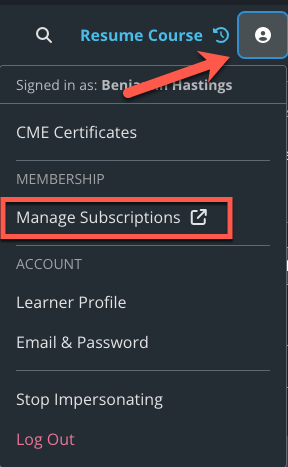
- Click on your profile in the top right corner. In the drop-down menu select “Manage Subscriptions”
-
Click “Cancel Subscription” under the subscription you would like to end after the current subscription period.
Once your subscription has been cancelled, you will continue to have access to your plan content and benefits for the remainder of your subscription period. Should you choose to purchase a membership in the future, we retain your progress on all courses, even if you cancel your membership.